Donetick features

Less managing.
More getting things done.

Recurring chores, household projects, points, reminders, and automation: Donetick keeps everyday responsibilities in one place, whether you use it on your own or share the work. See how each feature fits your routine.

Get started free
Quick add & scheduling

Write it once. Let it come back on schedule.

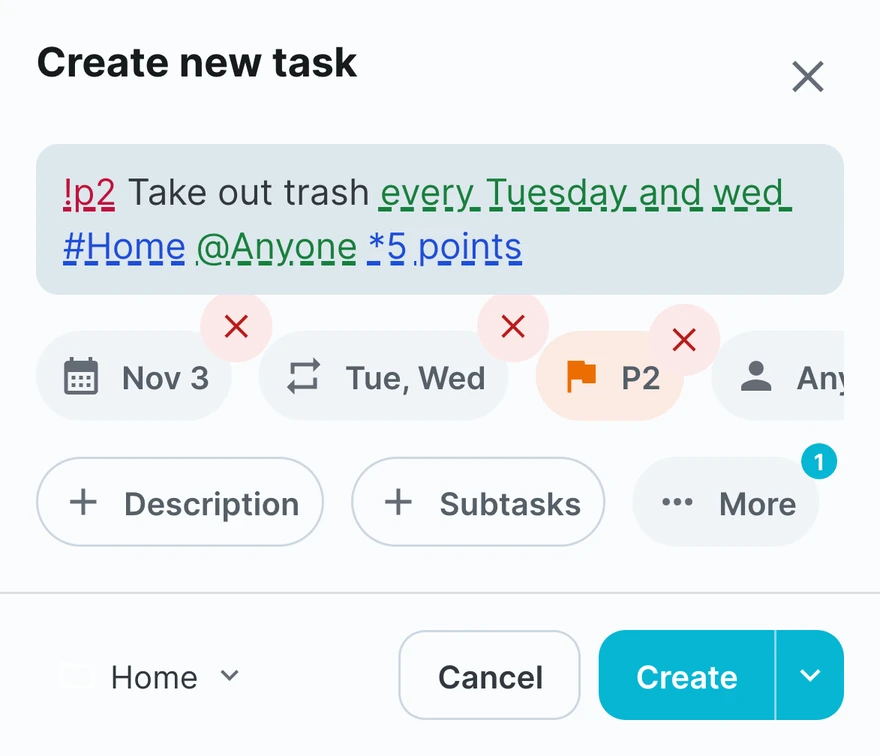
Type a task with its schedule, @assignees, and #labels, then review the parsed details before saving. Use daily, weekly, or custom recurrence for everything from laundry to a seasonal maintenance check.

Choose recurrence from the due date for a fixed routine, or from completion when the interval should start after the job is actually done.

  • Quick add: “Change the water filter every 3 months @Jake #Home.” Review the recognized fields before saving.
  • Fixed schedule: clean the bathroom every Saturday, even if last week’s clean happened late.
  • From completion: replace a filter three months after you actually changed it.
  • Adaptive scheduling: base future timing on the intervals between your recorded completions when a fixed frequency is hard to choose.
Find a recurring task template
Donetick quick-add sheet recognizing a recurring task, label, priority, and assignee
Shared responsibility

Give every chore a clear next person.

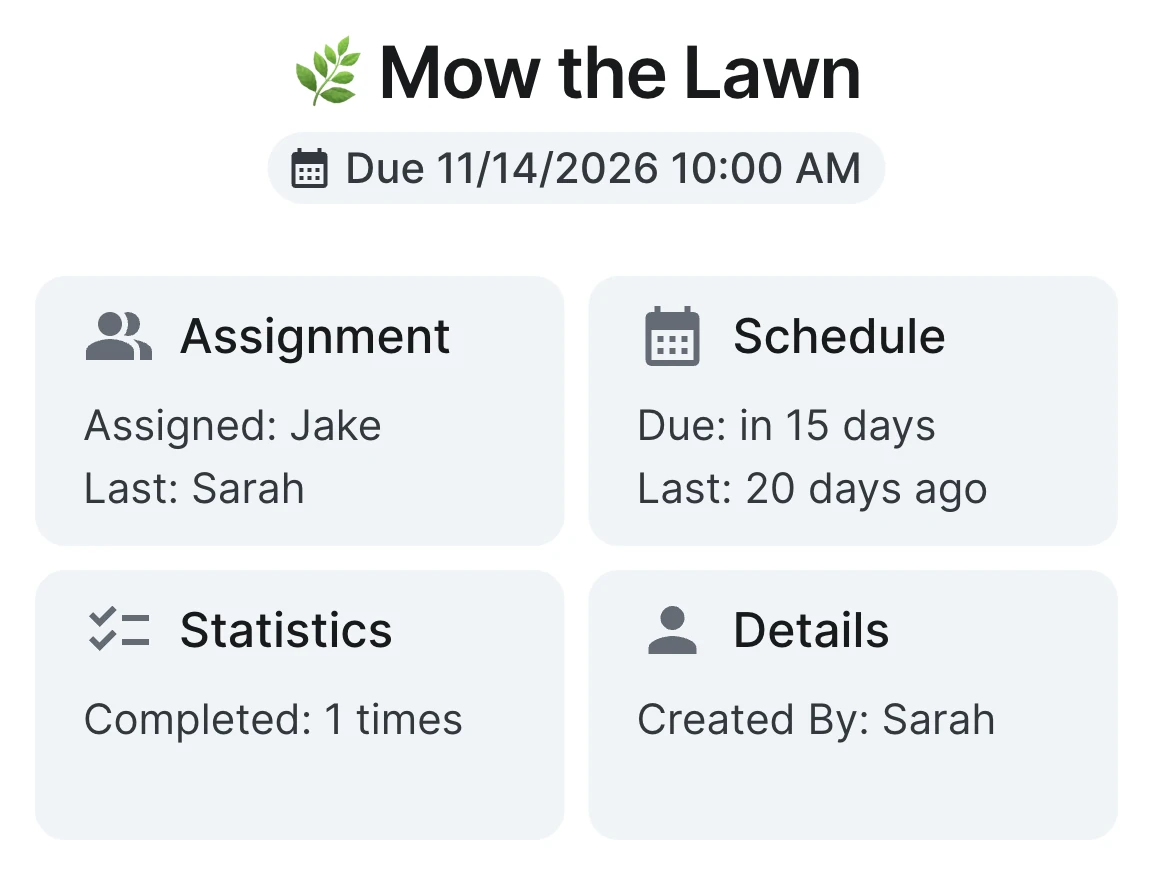
Assign a task to someone or choose round-robin, random, or least-done-first assignment. With round-robin, completing the chore moves the turn to the next person in the rotation.

Everyone in the household can see responsibility. Rotation and completion counts help make the work visible, but they do not measure equal effort or guarantee a fair split.

  • Round-robin: take turns with the kitchen clean across the people assigned to it.
  • Random: let Donetick choose the next assignee rather than keeping a fixed order.
  • Least-done-first: use completion counts to choose the next person. Counts are not a measure of workload.
Explore chore rotation
Donetick task details showing Mow the Lawn assigned to Jake and last completed by Sarah
Planning & task views

See your routine before it piles up.

Use task lists and the calendar to see upcoming work. Add due dates, priorities, and labels to organize your household chores and find the tasks you need.

Building a routine from scratch? Try the free weekly schedule maker, then set up the recurring tasks you want to track in Donetick. The printable planner is separate from your app account.

  • Scan today’s jobs, overdue chores, and upcoming maintenance in the task list.
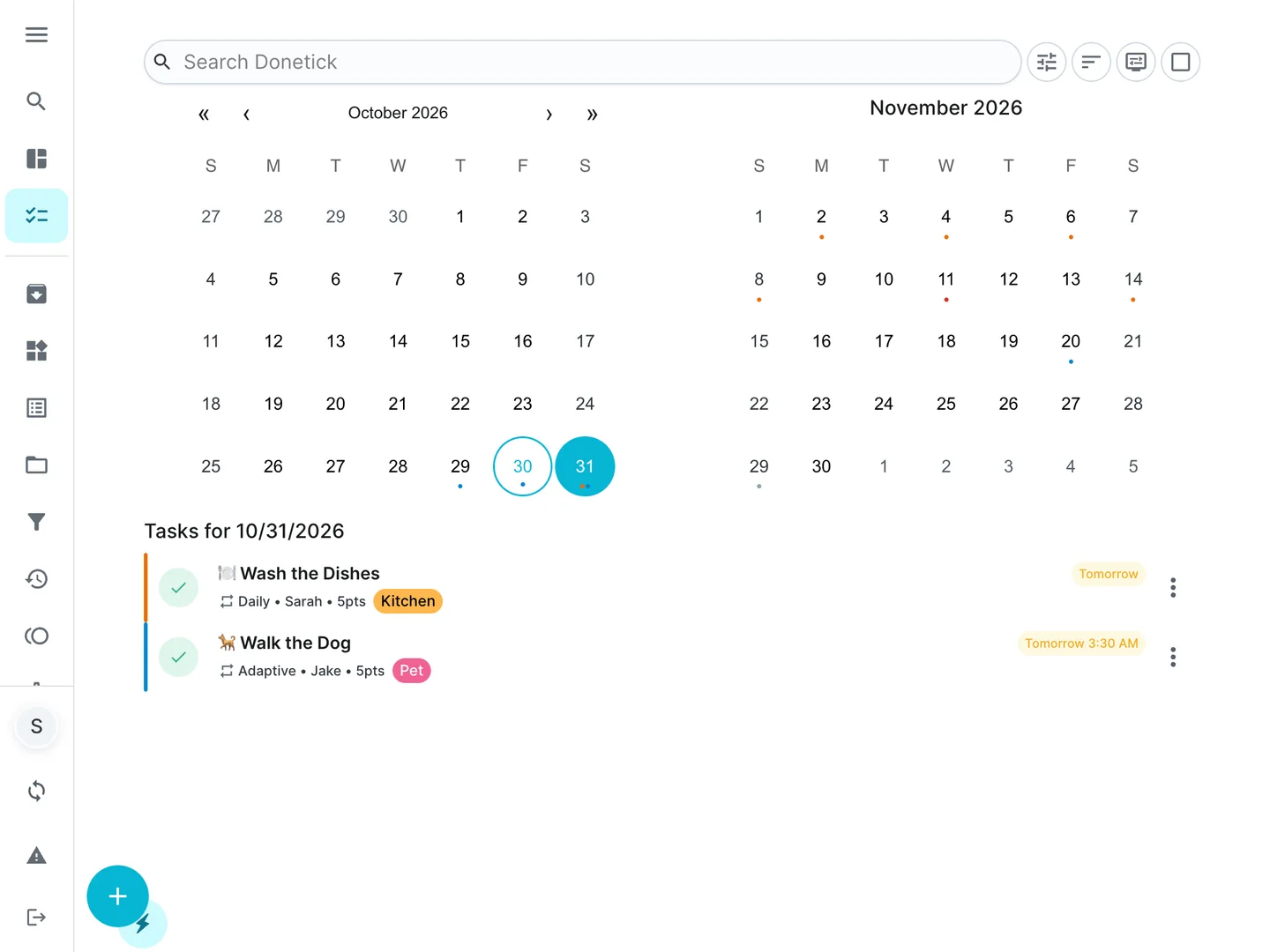
  • Use the calendar and filter by assignee when planning the week ahead.
  • Label tasks Kitchen, Bathroom, or Laundry, then save quick filters for the views you revisit. Basic includes two saved quick filters; Plus is unlimited.
Build a weekly chore schedule
Donetick calendar showing household chores scheduled across the month
Projects & subtasks

Keep the bigger home jobs moving, too.

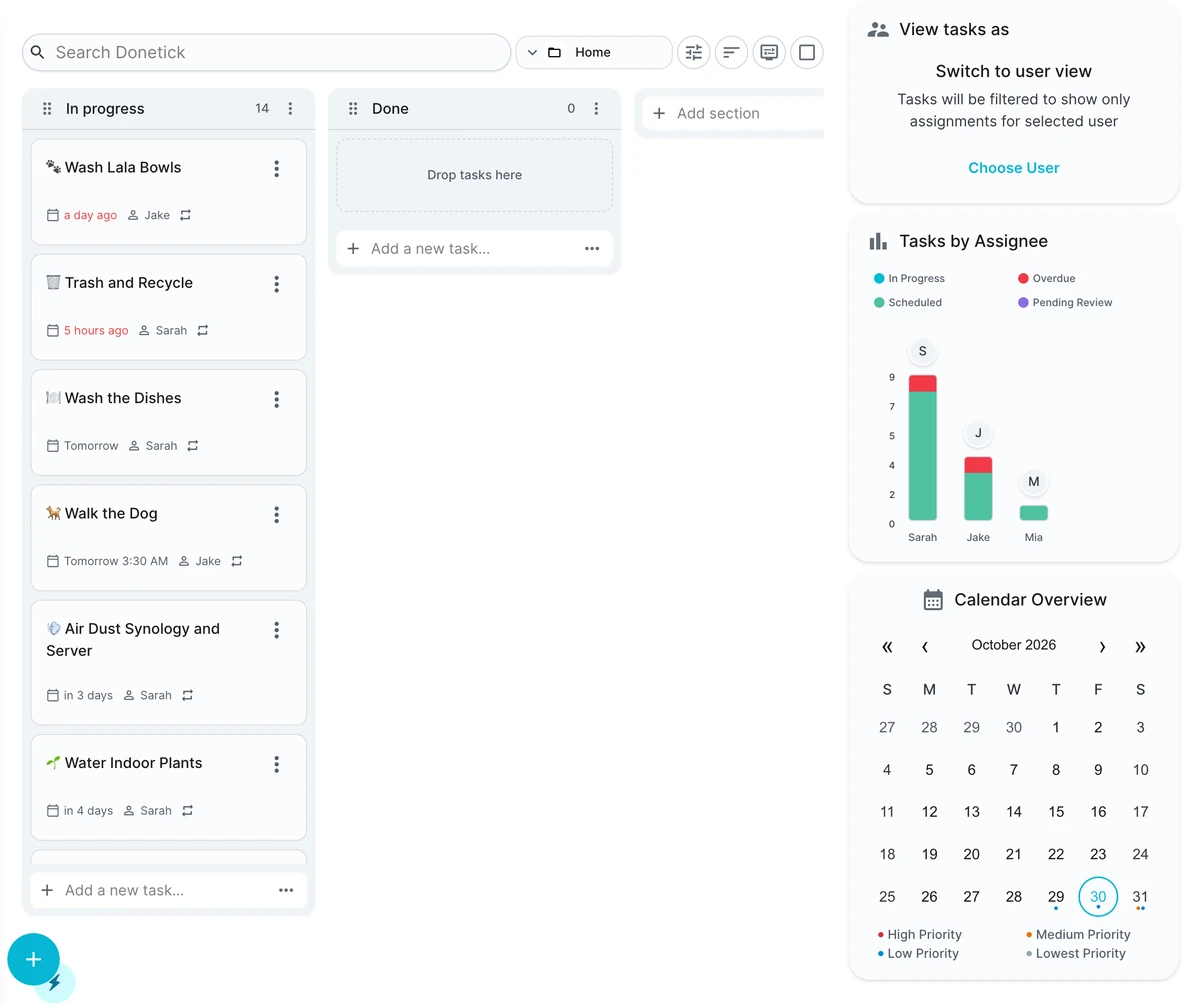
Group related work into a project, break tasks into subtasks, and follow progress in list or board views. Plan a room refresh or a garden project alongside the chores that keep coming back.

Use Donetick on your own or with your household. Basic includes five projects; Plus includes unlimited projects. It is a home task organizer, not a tool for project budgets or dependency planning.

  • Room refresh: group choosing paint, buying supplies, and preparing the walls into a project.
  • Subtasks: break a larger job into smaller steps you can check off.
  • List or board: follow the same project in the view that suits you, including on your phone.
Explore personal projects and home maintenance
Donetick Home project board with tasks in In progress and Done columns
Completion history

Know who did it and when.

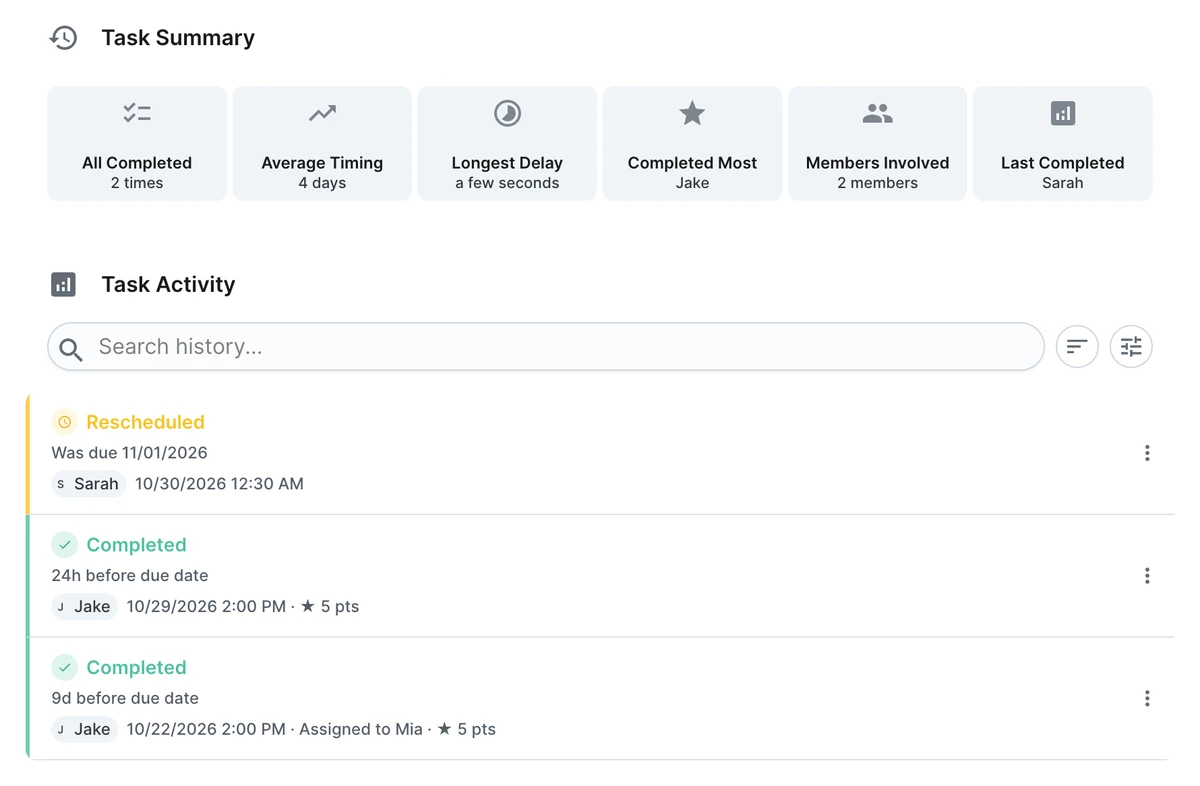
Check a task’s completion history instead of relying on memory. See who last cleaned the bathroom or when a filter was replaced, with task activity alongside completed work.

Basic includes the last 30 days of history. Plus gives access to full available history. Completion counts show recorded work; they are not a complete measure of someone’s contribution.

  • Check when the sheets were last washed or who completed the bathroom clean.
  • Review task activity and completion notes for context beyond a check mark.
  • Use completion summaries to spot patterns, without assuming every task takes the same effort.
Compare Basic and Plus
Donetick task history with completion records, household members, and task activity
Reminders & nudges

A reminder when it’s due. A nudge when it needs one.

Basic includes one on-due-date reminder per task. Plus adds before- and after-due-date reminders, so you can plan ahead or follow up on overdue jobs.

Example reminder · delivery depends on your notification setup

Scheduled reminders

For a maintenance check, Plus can remind you before the due date and follow up afterward. Reminder timing is configured per task; delivery depends on notification settings and device permissions.

Manual nudges

Send assignees a message about a pending chore when you choose. Customize the message and choose whether to notify all assignees. This is separate from a scheduled reminder.

Your notification setup

Donetick supports app push notifications and configurable channels such as Telegram and webhooks. Additional channels may require Plus and their own setup; enabling a reminder does not automatically connect an external service.

Announce due tasks on Alexa or your phone with Home Assistant using our step-by-step guide and downloadable blueprint.

Compare reminder options and plan limits
Make it your own

More than a repeating checklist.

Start with the basics. Add motivation, time tracking, and connected workflows when you need them.

Example reward · agreed and managed by your household

Points with a purpose

Set chore points, follow the leaderboard, and redeem household rewards. Add approval before points are awarded when needed.

Agree on rewards together. Points motivate; they don’t measure equal effort.

Explore Donetick for families
Example session · record the time you choose to track

Make time visible

Start and pause a task timer, then review recorded sessions. Give a quick tidy and a deep clean a little more context.

Track a garage clean, pause for a break. Only recorded time is counted.

Try task time tracking
Example window · ready when the time is right

Done at the right time

Set completion windows to control how early a scheduled chore can be checked off.

Let tonight’s bin run be completed a few hours early not days in advance.

Find a routine to start with
Example workflow · connections require setup

Connect your workflows

Use the REST API, webhooks, and Things triggers to connect chores to your routines. Things can trigger tasks from a value or state.

Try a Home Assistant announcement. API tokens, Thing triggers, and advanced automation require hosted Plus and setup.

Read the integration documentation
Illustrative conversation · compatible assistant and MCP setup required

Your chores, meet AI

Connect a compatible assistant through MCP (Model Context Protocol). Ask it to label chores by room or organize tasks into projects.

Tools vary by assistant; review changes. MCP requires hosted Plus and setup.

Explore MCP setup
Example routine · a tag right where the job happens

Tap a tag, mark done instantly

Tap an NFC tag with your phone to mark a chore done right where it happens. Place tags next to your plant to scan after watering, or by the filter cabinet when replacing filters.

Put a tag on the filter cabinet. New filter in, quick tap, done.

Try NFC tags and photos
Example scan · review the suggested task before saving

Snap the mail. Get a task.

Scan a bill or renewal notice to suggest a task and due date. Reading happens on your device, and the photo stays attached.

Water bill → “Pay water bill.” Review the suggested details before saving.

Try scan to task
Example Circle · separate accounts, one shared routine

One household. Your own account.

Invite people to your Circle to share chores and assignments. An admin approves each join request before membership becomes active.

Use web, iOS, or Android or keep a shared tablet in the kitchen.

See how joining works

Open source. Your choice.

Enable two-factor authentication. Start with hosted Donetick, or use the open-source code to run your own installation.

Self-hosting puts updates, backups, and installation security in your hands.

Explore self-hosting

Feature availability depends on your plan and installation. Compare Basic and Plus for hosted plan limits; integrations and notification channels require configuration.

Questions about Donetick features

Does Donetick include task reminders?

Yes. Basic includes one on-due-date reminder per task. Plus adds reminders before and after the due date. Check your notification settings and device permissions when setting up reminders.

What is the difference between a reminder and a nudge?

A scheduled reminder is tied to a task’s due date and the reminder timing you configure. A nudge is a message you manually send to assignees about a pending task. Notification delivery depends on the recipient’s configured channels and permissions.

Can Donetick track time as well as completed tasks?

Yes. Tasks have a built-in timer with start and pause controls and recorded time sessions. Completion history and time tracking provide different context: a completion records that a job was done, while a timer records the time you chose to track.

Can I use Donetick without a household?

Yes. You can manage personal tasks, home maintenance, and projects on your own, and invite other people if you want to share the work later.

Are all these features included for free?

Basic includes recurring chores, assignment, task views, and projects with limits. Basic has five projects, two saved quick filters, and 30 days of history. Plus adds unlimited projects and saved filters, full available history, and more flexible reminders. See the plans page for the full comparison.

Make room for the good stuff

A home you share.
A routine you share, too.

Add a few chores, send one invite link, and stop being the only person who remembers.

Start your household

Free to start! No card to start.